Application Recorder
Dragonfly includes a simple, easy-to-use application recorder that lets you automatically record your full screen while working. The application recorder, which can be used to make tutorial videos or to illustrate an issue you may experience while working with Dragonfly, does the following:
- Records your full screen in high-quality resolution in full color.
- Mouse highlighting spotlights the location of the cursor.
- Recordings can be saved in the MPEG4 (*.mp4 extension), AVI (*.avi extension), or animated GIF (*.gif extension) file formats.
When exporting to GIF, Dragonfly will first render the full sequence as an MPEG and then calculate the best color palette for the animated GIF, which is limited to 256 colors. You should note that the temporary MPEG will not be retained in memory.
 How to Record Your Screen
- Choose Tools > Application Recorder on the menu bar to open the Recorder panel, shown below.
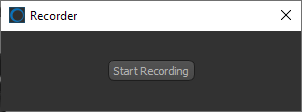
- Click the Start Recording button.


